

Local SEO Competitor Analysis for Google Maps and Search
Compare the right local competitors in Google Maps and organic search. Use an agency comparison log to turn verified differences into assigned work.




The short answer
- Compare local competitors for a specific service, branch and search location, keeping Google Maps or local-pack listings separate from organic website results.
- Record the evidence behind each difference. Review counts, page length and a higher position do not reveal the cause of a ranking.
- Turn a relevant gap into a confirmed client fact, an assigned change and a completion check. Keep a stable benchmark when comparing later observations.
Local SEO competitor analysis starts with businesses appearing for the same customer task, search location and result surface. A dental practice across town may compete for patients without appearing beside your client's branch for an urgent appointment search. A directory can compete for the website click without being a dental practice at all.
On this page
1. Start with the client's service and branch
Write down the customer decision before collecting competitors. “Find a dentist” and “get an emergency appointment this afternoon” may involve different providers, availability and pages. Confirm that the client offers the service at the branch you are reviewing.
For a first pass, choose one commercially important service and a manageable set of representative search points. This is a research scope, not a prescribed number of keywords or a claim about the whole market. Use the local keyword research guide when the query or intended page is still unclear.
Keep these conditions beside every result sample:
- Exact query and intended client branch.
- Search point or reported location, language, device and result surface.
- Date, time and timezone, plus relevant filters such as “open now.”
- Collection method, checked depth and any location uncertainty.
Incognito mode alone does not establish the customer's location. If your method reports only a city, record that limit rather than describing the result as a precise street-level measurement.
Google's local ranking explanation describes relevance, distance and prominence. A result observed near one practice cannot establish which business is most visible across town.
2. Build separate Maps and organic comparison sets
Save the business or branch identity for each Maps listing and the actual ranking URL for each organic result. Keep ads separate. A familiar brand name is not enough to identify which branch or page appeared.
| Result you encounter | What it competes for | How to record it |
|---|---|---|
| A nearby practice in Maps | The local business choice under those search conditions | Listing URL, branch identity and observed position |
| Another practice's emergency service page | The website click and service enquiry | Exact ranking page and the question it answers |
| A directory's emergency dentist list | The organic click before a practice is selected | Directory URL and page type, separate from direct providers |
Choose relevant operators that recur across the sampled conditions. Include a business that exposes a useful service gap even if it is not the client's best-known rival. Explain the selection in the brief so the next person can reproduce it.
For wider Maps coverage, use a consistent geographic sample and read the Google Maps ranking grid guide. That guide covers point comparisons and coverage calculations. Here the job is to decide which competitors deserve inspection and what their evidence can support.
Hypothetical agency example. A two-branch dental client names a large practice near its West clinic as its main rival. For the East clinic's urgent-care research, the agency also finds a nearer independent practice and an organic directory. It keeps the independent practice in the East Maps set, the directory in the organic set, and the client's named rival as a separate business benchmark. It does not force every result into one league table.
3. Compare facts that change a customer decision
Read the competitor's profile and the page it sends customers to. Then inspect your client's equivalent journey. Keep a source link or dated capture for each observation.
Start with:
- Profile identity and service fit. Is this the correct branch? What category is displayed? Do the hours, website and appointment destination describe the operation you are comparing?
- Page usefulness. Does it explain the relevant treatment or service, where it is offered, availability and the next contact action? Does your client answer those questions accurately?
- Reviews and reputation. Record the displayed rating, review count and collection date. Read relevant feedback for customer questions; do not turn a numerical gap into a guaranteed review target.
- Listings and relevant links. Inspect important industry or local sources. Is the information accurate? Is there a legitimate organization or publication the client should know about?
Google's business representation guidelines require a real-world business name and accurate, specific categories. A rival's extra keywords do not justify adding them to your client's name. Choose categories that describe the actual operation.
Google says reviews and links contribute to prominence. It does not publish a formula that lets you conclude “this practice wins because it has 40 more reviews.” A competitor screenshot cannot show their booked appointments or prove that a longer page caused a higher position.
A useful chamber listing may be worth checking for business relevance. A purchased ranking-link package is a different proposal. Google's link-spam policy covers buying links for ranking purposes. Avoid copying a rival's tactic merely because you can see it.
4. Turn a difference into an assigned task
Fictional worked example. A competing East-side practice clearly explains how to ask about same-day appointments. Your client's East clinic page says only “contact us.” That observation raises a useful question: does the client actually offer same-day appointments at this branch?
The account manager confirms the service and its limits with the practice manager. The writer can then add an accurate enquiry instruction to the existing East page. If the clinic does not offer that service, the proposed change stops there.
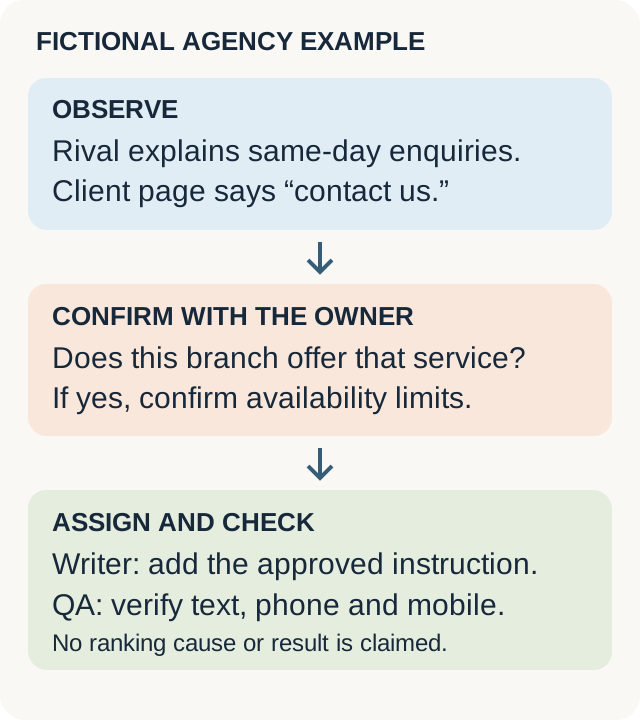
Fictional example: the observation leads to a service check before a page change. It does not establish why a competitor ranks.
The handoff should be specific enough for another person to finish:
East branch page: explain how patients can enquire about same-day slots, subject to availability. Practice manager confirms the wording and correct phone number. Writer updates the existing page. QA checks the approved text, branch phone link and mobile layout.
Download the competitor comparison log. It includes fictional completed examples and a blank row. It is a manual planning file, not a product import or a completed client audit.
Each row keeps the query, branch, location, surface, source, observation, question, owner-approved fact, proposed work, assigned owner and completion check. Leave unknown facts blank with a named follow-up. Do not fill them with a tool's confidence score.
Prioritize a confirmed wrong contact route or missing service detail ahead of collecting more competitor screenshots. Put delivery issues in the agency local SEO audit register. When the proposed task is a new page, check the existing page map before creating another destination.
5. Recheck comparable conditions and name the benchmark
Keep a fixed comparison set for the trend you are reporting. Log newly discovered competitors separately. Replacing last month's benchmark with this month's strongest business changes the comparison, even if both reports use a column called “main competitor.”
Repeat the relevant query, points, surface and settings. Record changed business hours, listing identities, page destinations or collection methods. If a point is outside the checked depth, retain that status rather than inventing its exact position.
Report the completed work alongside the observations:
- The branch's service facts were confirmed.
- The approved page and contact route passed the specified checks.
- A later sample showed the recorded visibility under its stated conditions.
- Enquiries or booked work changed only if the client supplied evidence for those outcomes.
Use the local SEO reporting template to keep implementation, visibility and business results separate. Competitor analysis is finished when it supports a defensible next action and a useful follow-up, not when every blank cell contains a number.